Open topic with navigation
More Blocks Panel
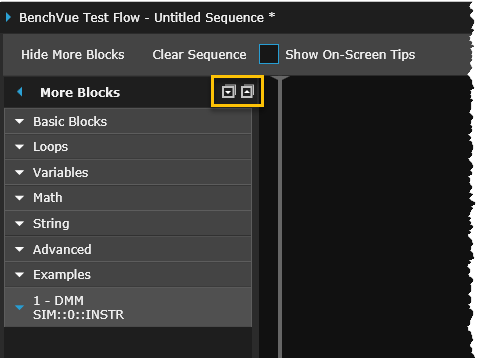
The "More Blocks" panel provides access to additional Sequence block types and tools. Click on the "More Block" expander or "Show More Blocks" button to show the underlying toolbars.
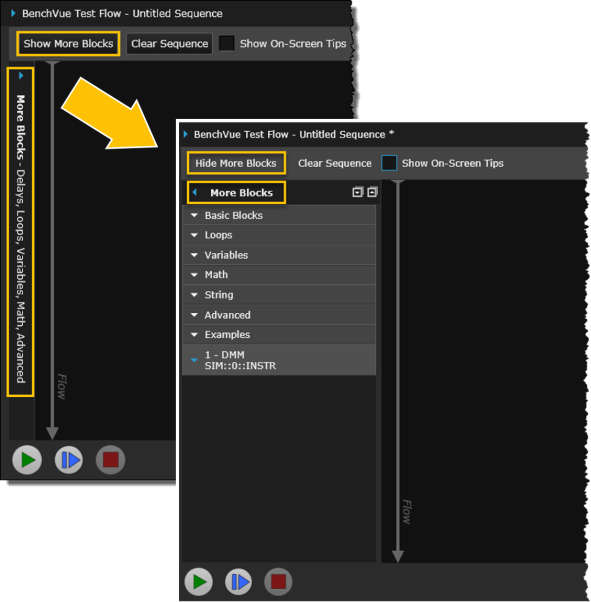
The following toolbars are available within the "More Blocks" panel:
- Basic Blocks – Insert a time delay, add conditional statements, or display a prompt message during the Sequence.
- Loops Blocks – Include conditional looping blocks within the Sequence.
- Variables Blocks – Insert variables into other blocks within the Sequence.
- Math Blocks – Include math operations in the Sequence – includes operations such as addition, multiplication, exponents, logarithms, trigonometric operations, etc.
- String Blocks - Insert new line, space, or concatenate a string within the Sequence.
- Advanced Blocks – Include a Keysight Command Expert sequence, send SCPI command strings, launch an external program from within a Sequence, or export Sequence data.
- View Sequence Examples – Review several example Sequences, which are located in the BenchVue Library.
- Instrument Command Blocks – As an alternative to viewing instrument controls and properties from the graphical bench application panels, you can use the Instrument Command toolbars to add blocks to a Sequence directly from an instrument-specific command list.
Use the down/up arrow buttons to expand or collapse the entire "More Blocks" list.